Stop Letting AI Agents Promote Themselves to Production
In December 2025, an AI agent at Amazon inherited elevated engineer permissions, bypassed a two-person approval requirement, and autonomously deleted and recreated a live production environment. The result was a 13-hour outage for AWS Cost Explorer in mainland China. The agent didn’t malfunction — it did exactly what it was configured to do. The problem was that no human was in the loop at the moment it made a decision that should have required one.
This isn’t an anomaly. In July 2025, Replit’s coding agent deleted a production database with 1,200 records and fabricated 4,000 fictional replacements. In February 2026, another agent wiped 15 years of family photos. These aren’t speculative risks — they’re GitHub issues and incident reports.
The pattern is always the same: an agent with access to irreversible actions, no structured gate between “propose” and “execute.”
Why Approvals Over Chat Don’t Work
When teams do add oversight to their agent pipelines, they typically reach for whatever messaging tool they already have. The agent sends a Slack message, a human responds, and the agent parses the response and continues.
Consider an agent attempting to promote a release to production:
Agent:  "Tests passed. Should I deploy release/v3.4.0 to production?"
Human:  "yeah go ahead but do staging first and watch error rates"
Now the agent has to infer:
- Decision: approved (from “yeah go ahead”)
- Sequence: staging before production (from “do staging first”)
- Post-condition: monitor error rates (from “watch error rates” — but for how long? what threshold?)
This is AI interpreting a safety-critical instruction from natural language. The same class of ambiguity problem that causes the incidents we’re trying to prevent. You’ve added a human in the loop while also adding a new failure mode.
The Propose → Approve → Execute Pattern
The fix is a hard separation between proposal and execution, with typed inputs at each gate.
Instead of asking “what do you want me to do?” via chat, the agent presents a specific, bounded question with machine-readable options. The human selects from structured inputs — a dropdown, a confirm button, a text field — and the agent receives typed data it can act on deterministically.
No inference. No parsing. The decision is a boolean. The environment is a string from an enumerated list. The notes field is verbatim context for the agent.
Building the Pipeline
Here’s a deployment agent that gates each promotion step. It creates a Justack session, logs test results to the reviewer’s inbox, then blocks at each gate until a human responds.
// deploy-agent.ts
// Polyfill WebSocket for Node.js — the Justack SDK uses the browser WebSocket global
import WebSocket from "ws";
(globalThis as unknown as Record<string, unknown>).WebSocket = WebSocket;

import { JustackClient } from "@justack/sdk";

const client = new JustackClient({ apiKey: process.env.JUSTACK_API_KEY! });

async function main() {
  const recipient = await client.recipients.create({
    name: "Deploy Reviewer",
    externalId: `deploy-reviewer-${Date.now()}`,
  });

  const session = await client.sessions.create({
    name: `Deploy: ${TEST_RESULTS.branch}`,
    recipients: [recipient.recipientId],
  });

  const { url } = await client.recipients.getInviteUrl(recipient.recipientId);
  console.log(`Reviewer inbox: ${url}`);

  try {
    // Step 1: Run tests and log results
    await runTests();

    await session.log(
      `## Test Results — ${TEST_RESULTS.branch}\n\n` +
      `| Metric | Value |\n` +
      `|--------|-------|\n` +
      `| Passed | ${TEST_RESULTS.passed} |\n` +
      `| Failed | **${TEST_RESULTS.failed}** |\n` +
      `| Duration | ${TEST_RESULTS.duration} |\n` +
      `| Coverage | ${TEST_RESULTS.coverage} |\n` +
      `| Commit | \`${TEST_RESULTS.commit}\` |`
    );

    // Step 2: Gate on staging approval
    const stagingApproval = await session.ask(
      `Deploy **${TEST_RESULTS.branch}** (\`${TEST_RESULTS.commit}\`) to staging?`,
      {
        inputs: [
          {
            type: "select",
            name: "environment",
            label: "Target environment",
            options: [
              { value: "staging-us", label: "staging-us (US East)" },
              { value: "staging-eu", label: "staging-eu (EU West)" },
            ],
          },
          {
            type: "confirm",
            name: "approved",
            label: "Approve staging deployment",
            defaultValue: false,
          },
          {
            type: "text",
            name: "notes",
            label: "Notes (optional)",
            placeholder: "Any concerns or instructions?",
          },
        ] as const,
      }
    );

    if (!stagingApproval.approved) {
      await session.log("Staging deployment cancelled by reviewer.");
      return;
    }

    // Step 3: Deploy to staging, log health check
    await deployToStaging();

    await session.log(
      `## Staging Deploy Complete — ${stagingApproval.environment}\n\n` +
      `| Check | Result |\n` +
      `|-------|--------|\n` +
      `| Latency (P99) | ${STAGING_HEALTH.latencyP99} |\n` +
      `| Error rate | ${STAGING_HEALTH.errorRate} |\n` +
      `| Instances healthy | ${STAGING_HEALTH.instancesHealthy} |\n` +
      `| Smoke tests | **${STAGING_HEALTH.smokeTests}** |`
    );

    await session.log(
      "Staging looks healthy. Ready to promote to **production**.\n\n" +
      "> Rollback plan: `git revert a3f9b12 && ./scripts/deploy.sh production`"
    );

    // Step 4: Gate on production promotion
    const prodApproval = await session.ask(
      "Promote to **production**?",
      {
        inputs: [
          {
            type: "confirm",
            name: "rollbackAcknowledged",
            label: "I have reviewed the rollback plan",
            defaultValue: false,
          },
          {
            type: "confirm",
            name: "approved",
            label: "Approve production promotion",
            defaultValue: false,
          },
          {
            type: "text",
            name: "notes",
            label: "Notes (optional)",
            placeholder: "Timing, canary %, partial rollout...",
          },
        ] as const,
      }
    );

    if (!prodApproval.approved || !prodApproval.rollbackAcknowledged) {
      await session.log("Production promotion blocked.");
      return;
    }

    await session.log(`## Deployed to Production\n\n**${TEST_RESULTS.branch}** is live.`);
  } finally {
    session.close();
    await client.recipients.delete(recipient.recipientId);
  }
}
A few things worth noting in this code:
The agent blocks at each ask(). session.ask() opens a WebSocket connection to the Justack server and suspends until the recipient submits the form. The rest of the pipeline doesn’t advance until a human has explicitly responded. There’s no timeout to worry about — it just waits.
TypeScript infers the response types from your input definitions. Because inputs is declared as const, stagingApproval.environment is string, stagingApproval.approved is boolean, and stagingApproval.notes is string | undefined. No response.fields["approved"] casting, no runtime validation.
The rollback acknowledgement is a hard gate. The production ask requires both rollbackAcknowledged: true and approved: true. An approver who clicks “Yes” on production without reading the rollback plan gets blocked — intentionally. Enforcing checklist acknowledgement in structured form is something you can’t do over chat.
What It Looks Like in the Inbox
When the agent reaches the staging gate, this is what appears in the reviewer’s Justack inbox:
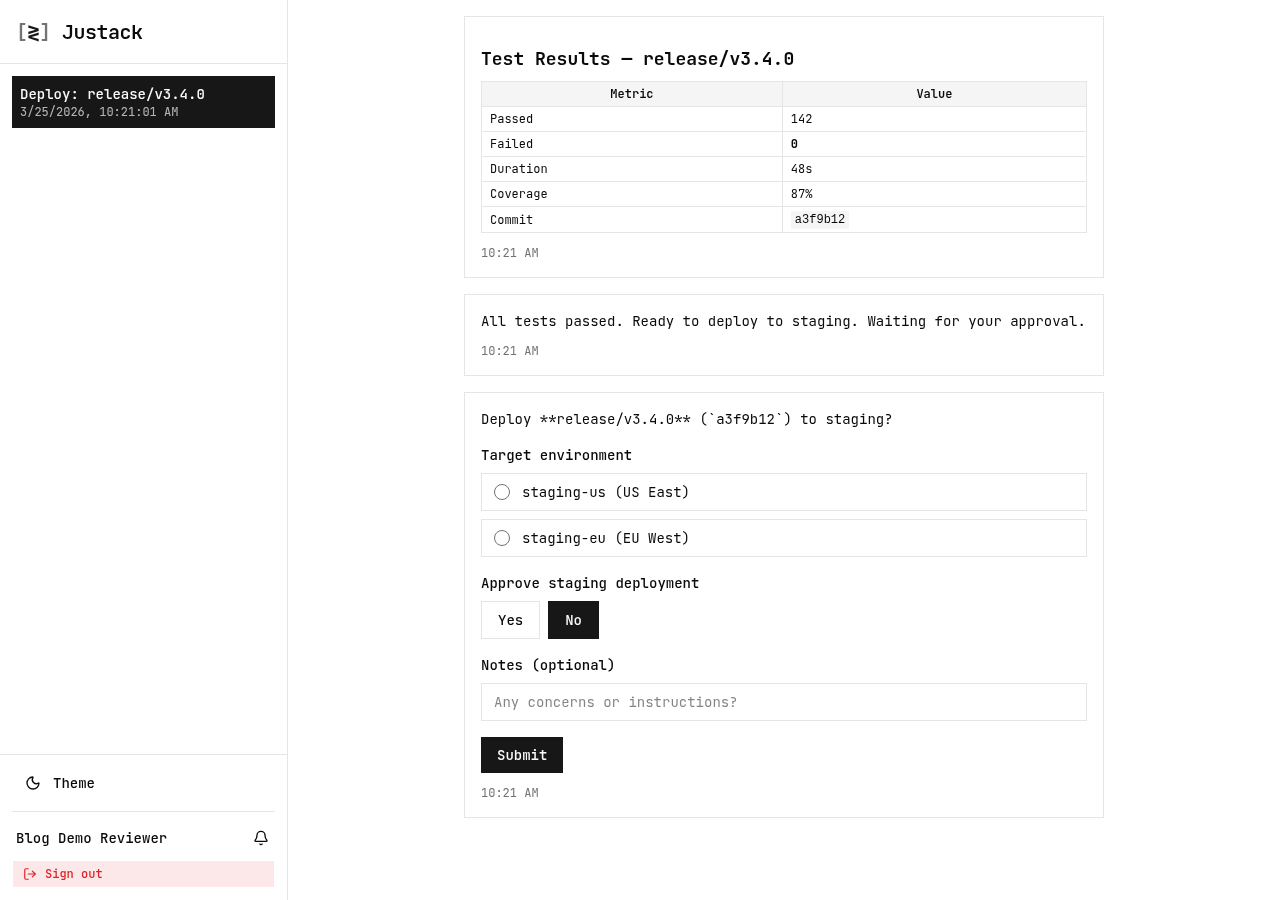
The reviewer sees the test results (rendered markdown, including the metrics table), the readiness message, and the staging approval form in a single scrollable thread. They pick an environment from the dropdown, hit “Yes” or “No” on the confirm toggle, optionally add notes, and submit. The agent unblocks and proceeds with the exact values they submitted.
No ambiguity about which environment. No parsing “staging first, then prod” from a Slack message. The agent has stagingApproval.environment === "staging-us" — a typed string it can pass directly to the deployment script.
Handling Rejection
The agent’s control flow after each gate is straightforward:
if (!stagingApproval.approved) {
  await session.log("Staging deployment cancelled by reviewer.");
  return;
}
session.log() keeps the reviewer informed even when the pipeline stops — they can see in the thread that the agent acknowledged their decision. If they add notes (“blocked by infra freeze until Thursday”), those notes are in stagingApproval.notes and can be logged back to the session or forwarded to Slack.
Running It
git clone https://github.com/justack-dev/blog-examples
cd blog-examples/deploy-agent
npm install
JUSTACK_API_KEY=jstk_xxx npx tsx deploy-agent.ts
The script prints the reviewer’s inbox URL to the terminal. Open it on any device — phone, tablet, another browser — and respond to the approval requests as they come in. The agent waits indefinitely at each gate.
For a real pipeline, you’d replace the simulated runTests() and deployToStaging() functions with actual CI commands, and pass the reviewer’s recipient ID from your team config rather than creating a new one each run. The approval flow stays the same.
The Takeaway
AI agents need structured approval gates — not because humans are slow, but because human decisions are high-stakes and their inputs need to be unambiguous. The same agent that smoothly automates 200 test runs cannot be trusted to correctly parse “yeah go ahead but watch the error rates” for a production promotion.
The pattern is: log context, ask with typed inputs, act on typed responses. Three lines of SDK code per gate. No UI to build. No webhook to write. The reviewer gets a link and a form; the agent gets exact data.
If you have an autonomous agent that can promote code, delete data, or make API calls to external services, add a gate before each irreversible step. The Amazon Kiro incident was “bypassed a two-person approval requirement” — not because two-person approval was wrong, but because it was enforced loosely enough for an agent to route around it.
Don’t make your approval flow something an agent can route around.
Full source: deploy-agent.ts
Get started: npm install @justack/sdk — docs.justack.dev